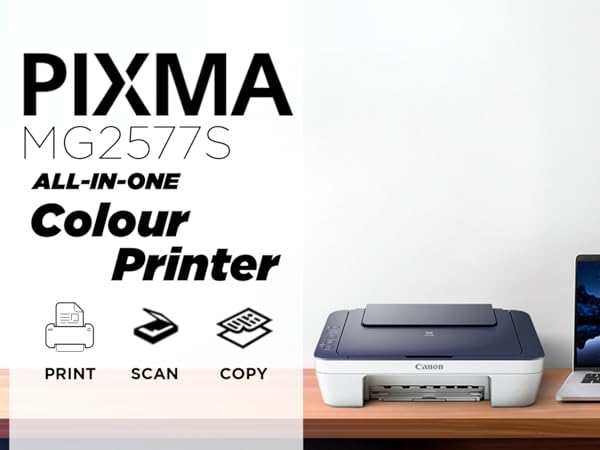
Canon PIXMA MG2577s
Overview:
The Canon PIXMA MG2577s is a compact all-in-one inkjet printer designed for home users who need reliable performance for everyday printing, scanning, and copying tasks. It is known for its consistent print quality, especially in color output, making it a strong choice for students and casual users who print documents as well as images.
This printer focuses on delivering balanced performance at an affordable price, without overcomplicating features.
Design and Build Quality:
The Canon PIXMA MG2577s features a sleek and minimalistic design that fits easily into modern home setups. Its compact body makes it suitable for small desks, study tables, or shared workspaces.
The plastic build feels slightly more refined compared to many entry-level printers, with a smooth matte finish that resists fingerprints and minor scratches. The hinges and panels are sturdy, ensuring long-term durability with proper handling.
The control panel is simple and user-friendly, with clearly marked buttons for basic functions like power, scanning, and copying. While it lacks advanced controls or a display screen, the simplicity makes it easy for beginners to operate.
Setup and Installation Experience:
Setting up the Canon PIXMA MG2577s is quick and beginner-friendly. The process involves:
-
Installing ink cartridges
-
Connecting the printer via USB
-
Installing drivers from Canon’s official source
The installation software is lightweight and easy to follow, guiding users step-by-step. Within a short time, the printer is ready for use.
Since it does not support Wi-Fi, the setup is limited to wired connections, which may feel outdated but ensures stable communication between the printer and the computer.
Print Quality:
Canon printers are known for their reliability in print quality, and the MG2577s maintains that reputation. It delivers sharp, clean, and consistent prints across different types of content.
Whether printing text documents or images, the output remains balanced without major quality fluctuations.
Text and Document Output:
Text printing is one of the strong areas of this printer. It produces:
-
Dark and well-defined characters
-
Clean edges with minimal smudging
-
Good readability even in smaller fonts
This makes it suitable for:
-
Assignments and notes
-
Office documents
-
Forms and reports
Compared to many budget printers, it offers slightly better clarity and consistency.
Photo and Color Output:
This is where the Canon PIXMA MG2577s truly shines. The printer delivers better-than-average color reproduction, making it ideal for users who occasionally print photos or graphics.
Key strengths:
-
Vibrant colors
-
Smooth gradients
-
Natural-looking tones
It performs well for:
-
School projects
-
Presentation graphics
-
Casual photo printing
While it is not designed for professional photography, it produces noticeably better results than many entry-level competitors.
Print Speed:
The print speed is moderate and suitable for everyday tasks. It is not designed for high-speed printing, but it maintains a good balance between quality and efficiency.
In real-world usage:
-
Small print jobs are handled smoothly
-
Medium workloads are manageable
-
Bulk printing may feel slow
Running Costs:
The Canon PIXMA MG2577s uses a cartridge-based system, which means recurring ink costs should be considered.
Important points:
-
Ink cartridges need replacement after moderate usage
-
Cost per page is higher compared to ink tank printers
-
Suitable for light to moderate printing
Cost-saving tips:
-
Use draft mode for regular printing
-
Avoid unnecessary color printing
Connectivity and Software:
The printer supports USB connectivity only, which limits flexibility but ensures stable performance.
Canon’s software enhances usability with features like:
-
Easy printing controls
-
Basic photo editing options
-
Scan and copy functions
The interface is simple and suitable for beginners.
Paper Handling and Usability:
The paper tray is designed for standard home usage. It works well for everyday printing but is not built for heavy workloads.
The printer supports different paper types such as:
-
A4 sheets
-
Photo paper
-
Lightweight cards
Paper feeding is generally smooth, with minimal issues when properly aligned.
Maintenance and Reliability:
The printer is reliable for regular use, provided it is maintained properly. Like most inkjet printers, it may require occasional maintenance.
Maintenance includes:
-
Cleaning print heads
-
Replacing cartridges
-
Keeping the printer dust-free
Regular usage helps prevent ink drying issues.
Noise and Power Consumption:
The printer operates quietly, making it suitable for home environments like study rooms or bedrooms. Power consumption is low, which is ideal for everyday usage.
Real-World Usage Scenario:
In daily life, the Canon PIXMA MG2577s performs well for:
-
Students printing assignments
-
Home users printing documents
-
Occasional color printing
It is not designed for heavy office use but works perfectly for personal and light tasks.
Pros:
 Excellent color output for its category Reliable and consistent performance Compact and space-saving design Easy to use for beginners Affordable initial cost
Cons:
✘ No Wi-Fi or wireless printing
✘ Higher running cost over time
✘ Average print speed
Who Should Buy This Printer?
-
Students
-
Home users
-
Users needing better color output
-
Light to moderate printing needs
Who Should Avoid This Printer?
-
Heavy users
-
Offices
-
Users needing wireless printing
Final Verdict:
The Canon PIXMA MG2577s is a well-balanced and reliable printer that delivers strong color performance and consistent results for everyday use. While it lacks modern features like Wi-Fi and has higher running costs, it remains a great option for users who want quality output at an affordable price.
If your priority is good color printing and simple usability, this printer is a solid choice.